Sticky Sidebar 😎
Originally written by Ahmed Bouhuolia
Sticky Sidebar v2 is a pure JavaScript plugin for making smart and high performance sticky sidebar, works with sidebar if it’s taller or shorter than the viewport, supports jQuery/Zepto and compatible with Firefox, Chrome, Safari, and IE9+. Source can be found on Github.
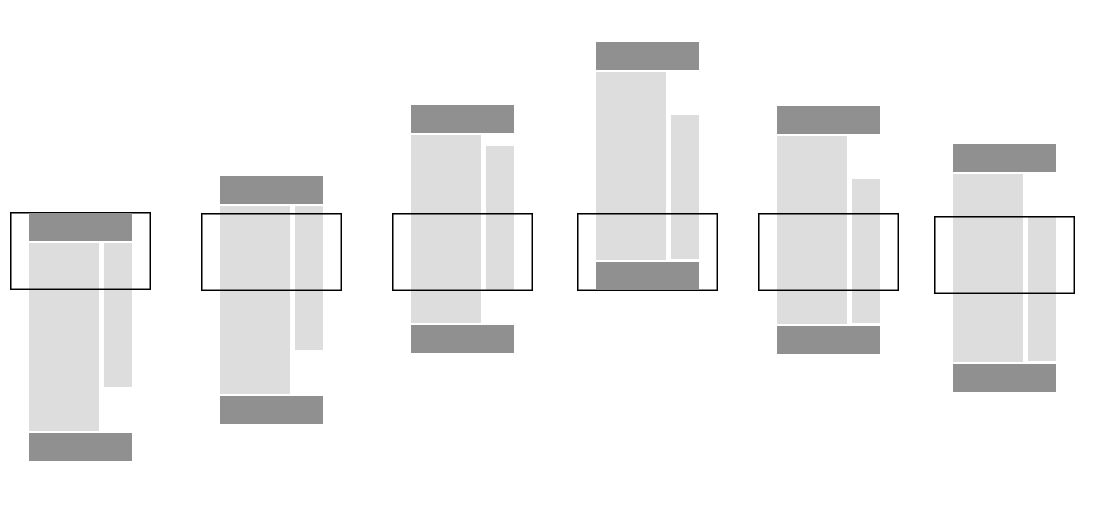
- Why sticky sidebar is awesome?
- Examples
- Installation
- Usage
- Configure Your CSS
- Options
- Events
- Public Methods
- Scrolling Performance
- Browser Compatibility
- jQuery/Zepto No Conflict
Why sticky sidebar is awesome?
- It does not re-calculate all dimensions when scrolling, just neccessary dimensions.
- Super smooth without incurring scroll lag or jank and no page reflows.
- It has event trigger on each affix type to hook your code under particular situations.
- Handle the sidebar when it is taller or shorter than the viewport. With
otherColumnSelector, the shorter column sticks instead, including when the heights change later. - Zero dependencies and super simple to setup.
Examples
Basic
Just call new StickySidebar('ELEMENT') on the element that you want it to be sticky when scrolling up/down inside their parent.
var sidebar = new StickySidebar('#sidebar', {topSpacing: 20});Scrollable Sticky Element
Sticky sidebar is smart enough to handle sidebar when it’s taller than the viewport. You don’t have to worry about content, it will scroll the sidebar independently, up and down.
var sidebar = new StickySidebar('#sidebar', {topSpacing: 20});Sidebar taller than the content
The plugin sticks one element, and only while it is shorter than its container. A sidebar that is already the tallest column stays put. Which column is taller depends on the content, and that can change after load. Pass the other column as otherColumnSelector and the shorter one sticks. It switches when either column changes height.
var sidebar = new StickySidebar('#sidebar', {
    containerSelector: '.container',
    innerWrapperSelector: '.column__inner',
    otherColumnSelector: '#content',
    topSpacing: 20,
    bottomSpacing: 20
});
Both columns need an inner wrapper with that selector. In the demo the article starts shorter, so the article sticks. Adding paragraphs until the article is taller makes the sidebar stick instead.
Installation
Install with npm, or download sticky-sidebar.js from GitHub and link to it from your page.
npm
npm install sticky-sidebar-v2
Usage
Your website’s HTML structure has to be similar to this in order to work:
<div id="main-content" class="main">
    <div id="sidebar" class="sidebar">
        <div class="sidebar__inner">
            <!-- Content goes here -->
        </div>
    </div>
    <div id="content" class="content">
        <!-- Content goes here -->
    </div>
</div>
Note that inner sidebar wrapper .sidebar__inner is optional but highly recommended, if you don’t write it yourself, the script will create one for you under class name inner-wrapper-sticky, but this may cause many problems.
For the above example, you can use the following JavaScript:
<script type="text/javascript" src="./js/sticky-sidebar.js"></script>

<script type="text/javascript">
    var sidebar = new StickySidebar('#sidebar', {
        containerSelector: '#main-content',
        innerWrapperSelector: '.sidebar__inner',
        topSpacing: 20,
        bottomSpacing: 20
    });
</script>
Usage with jQuery/Zepto
You can configure sticky sidebar as a jQuery plugin, just include jquery.sticky-sidebar.js instead of sticky-sidebar.js file than configure it as any jQuery plugin.
$('#sidebar').stickySidebar({
    topSpacing: 60,
    bottomSpacing: 60
});
Make sure to include jquery.sticky-sidebar.js script file after jquery.js.
Configure Your CSS
Next you are going to need some CSS just to improve performance and prevent repainting on scrolling. Sticky sidebar plugin doesn’t add below styles as inline so you need to add them manually in your stylesheet.
.sidebar{
    will-change: min-height;
}

.sidebar__inner{
    transform: translate(0, 0); /* For browsers don't support translate3d. */
    transform: translate3d(0, 0, 0);
    will-change: position, transform;
}
Options
Sticky sidebar plugin comes with options to configure how it works. All options below are optional. Default values are presented below.
var stickySidebar = new StickySidebar('#sidebar', {
    topSpacing: 0,
    bottomSpacing: 0,
    containerSelector: false,
    innerWrapperSelector: '.inner-wrapper-sticky',
    otherColumnSelector: false,
    scrollContainer: false,
    stickyClass: 'is-affixed',
    minWidth: 0
});
topSpacing
Additional top spacing of the element when it becomes sticky. Default: 0.
var sidebar = new StickySidebar('.sidebar', {topSpacing: 50});bottomSpacing
Additional bottom spacing of the element when it becomes sticky. Default: 0.
var sidebar = new StickySidebar('.sidebar', {bottomSpacing: 50});containerSelector
Specify a container sidebar to limit the begin and end points of sticky element. Defaults to the closest parent of the sticky element. It is highly recommended to specify a container selector.
var sidebar = new StickySidebar('.sidebar', {containerSelector: '.container'});innerWrapperSelector
Inner wrapper selector of sticky sidebar, if this wrapper is not found inside sidebar element, the plugin will create one for you under class name inner-wrapper-sticky. It is highly recommended to write inner wrapper of sidebar yourself than add its selector to this option. Default: .inner-wrapper-sticky.
var sidebar = new StickySidebar('.sidebar', {innerWrapperSelector: '.sidebar__inner'});otherColumnSelector
Another column in the same container. The shorter of the two columns sticks, and this is decided again when either column changes height. A column that is not displayed, such as display: none, is left out of the comparison. Affix events are fired on whichever column is sticking, and the column that stops sticking receives the static event. Default: false.
var sidebar = new StickySidebar('#sidebar', {otherColumnSelector: '#content'});scrollContainer
If your content is inside a fixed-height element with a scrollbar, this element must be specified with the scrollContainer option.
var sidebar = new StickySidebar('.sidebar', {scrollContainer: '#main-viewport'});stickyClass
The name of CSS class which will be added to the sidebar element when it becomes sticky. Default: is-affixed.
var sidebar = new StickySidebar('.sidebar', {stickyClass: 'is-affixed'});minWidth
The sidebar returns to its normal position when the width of window is below this value. Default: 0.
var sidebar = new StickySidebar('.sidebar', {minWidth: 300});Events
Sticky sidebar plugin has various events which are triggered when affix state changes.
affix.top.stickySidebar — Fires immediately before the element has been affixed to the top of the viewport.
affixed.top.stickySidebar — Fires immediately after the element has been affixed to the top of the viewport.
affix.bottom.stickySidebar — Fires immediately before the element has been affixed to the bottom of the viewport.
affixed.bottom.stickySidebar — Fires immediately after the element has been affixed to the bottom of the viewport.
affix.container-bottom.stickySidebar — Fires immediately before the element has been affixed to the bottom of the container.
affixed.container-bottom.stickySidebar — Fires immediately after the element has been affixed to the bottom of the container.
affix.unbottom.stickySidebar — Fires immediately before the element is no longer bottomed out.
affixed.unbottom.stickySidebar — Fires immediately after the element is no longer bottomed out.
affix.static.stickySidebar — Fires immediately before the element has returned to its position.
affixed.static.stickySidebar — Fires immediately after the element has returned to its position.
For example if you want to detect when element sticks to top and bottom we might do:
var sidebar = document.getElementById('sidebar');

var stickySidebar = new StickySidebar(sidebar);

sidebar.addEventListener('affix.top.stickySidebar', function () {
    console.log('Sidebar has stuck top of viewport.');
});

sidebar.addEventListener('affix.bottom.stickySidebar', function (event) {
    console.log('Sidebar has stuck bottom of viewport.');
});
Public Methods
updateSticky - Force re-calculation of all cached dimensions of sidebar, container and viewport and update position of sidebar according to the new dimensions. Dispatching update.stickySidebar on the element passed to the constructor does the same thing.
var stickySidebar = new StickySidebar('.sidebar');

stickySidebar.updateSticky();
destroy - remove all inline styles, helper classes and event listeners.
var stickySidebar = new StickySidebar('.sidebar');

stickySidebar.destroy();
Scrolling Performance
Sticky sidebar plugin takes scrolling preformance very seriously, It’s built from the ground up to let you have sticky elements without incurring scroll lag or jank.
The biggest cause of scrolling jank is onScroll has a lot of work. But in this plugin we cached all dimensions as well as adding will-change: transform and working with translate(Y, X) instead of top: Y; Left: X; that increased performance significantly, while building Sticky sidebar plugin we prevent repainting and reflow to make it as smooth as possible.
Browser Compatibility
Sticky sidebar works in all modern browsers including Internet Explorer 9 and above, but if you want it to work with IE9, you should include requestAnimationFrame polyfill before sticky sidebar code. For backwards compatibility, a polyfill for ResizeObserver can also be included.
If you have any issue with browser compatibility, don’t hesitate to Submit an issue.
jQuery/Zepto No Conflict
Sometimes sticky sidebar plugin conflicts with other plugins. In this case, namespace collisions can occasionally occur. If this happens, you may call .noConflict on the plugin to revert the value of $.fn.stickySidebar.
var stickySidebar = $.fn.stickySidebar.noConflict(); // Returns $.fn.stickySidebar assigned value.
$.fn.stickySidebar = stickySidebar; // Give $().stickySidebar functionality.
Author
Ahmed Bouhuolia GitHub/Facebook/Twitter. Øystein Blixhavn GitHub/Twitter.